

Formifier
The Formifier extension turns selected spreadsheet columns into a public form whose submissions go directly into the spreadsheet. A modal lets users choose the form's columns, configure it and get a sharing link or embed code.
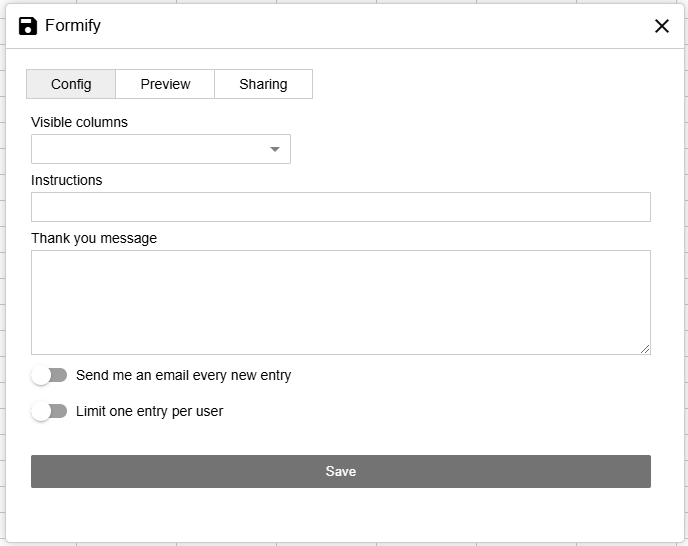
Frontend
Config Tab
| Property | Description |
|---|---|
Visible Columns |
Specifies which spreadsheet columns should be included in the public form. |
Instructions |
Text instructions at the top of the form, providing context or guidelines for end-users. |
Thank you message |
Upon successful form submission, a confirmation message will be displayed. |
Limit |
Sets a local restriction to prevent multiple submissions from the same device. You can manage this limit through the developer tools. |
Preview Tab
A live preview of the form with the current settings.
Sharing Tab
Generates a direct link and an embed code for external websites.
Embed code example
The direct link serves this page itself; the embed snippet loads the form renderer from a CDN and points it at the worksheet's form endpoint:
<div id="formify"></div>
<script src="https://cdn.jsdelivr.net/npm/@jspreadsheet/formify@3/dist/index.min.js"></script>
<script>
formify(document.getElementById('formify'), {
    url: 'https://your-server.example.com/api/2043e788-aad6-13e2-e2d4-89f1a9c72687/0/formify'
});
</script>
Server endpoints
The form endpoints are document routes of the Server API extension.
Routes
| Route | Description |
|---|---|
GET /api/<guid>/<worksheetIndex>/formify |
The standalone form page (the embed snippet above, rendered as HTML). |
GET /api/<guid>/<worksheetIndex>/formify/config |
JSON used by the form renderer: the worksheet's formify settings plus the column definitions of the visible columns. |
POST /api/<guid>/<worksheetIndex>/formify |
A form submission. The data body field carries the values keyed by column index (e.g. data[0], data[2]). |
How submissions are applied
A submission becomes an insertRow operation that goes through the same pipeline as any client edit: applied to the live document, persisted through your adapter and broadcast to connected users in real time.
Authentication
Public forms and private spreadsheets
The form routes skip the beforeConnect, beforeLoad and beforeChange hooks, so a public form works even when the spreadsheet is private. Access is granted by the document instead: the routes only respond when the target worksheet declares a formify configuration in its options, and return 403 Forbidden otherwise. Removing the configuration disables the form.
What a submission can write
Only values for the columns declared in formify.columns are kept; any other fields in the request body are discarded before the row is inserted.
Security Considerations
Rate limiting and validation
Add rate limiting or validation against spam and misuse, especially when the form is embedded on public pages.
Write access controls
Validate what gets inserted into the spreadsheet and set its privacy appropriately.